PreSonus Faderport 16
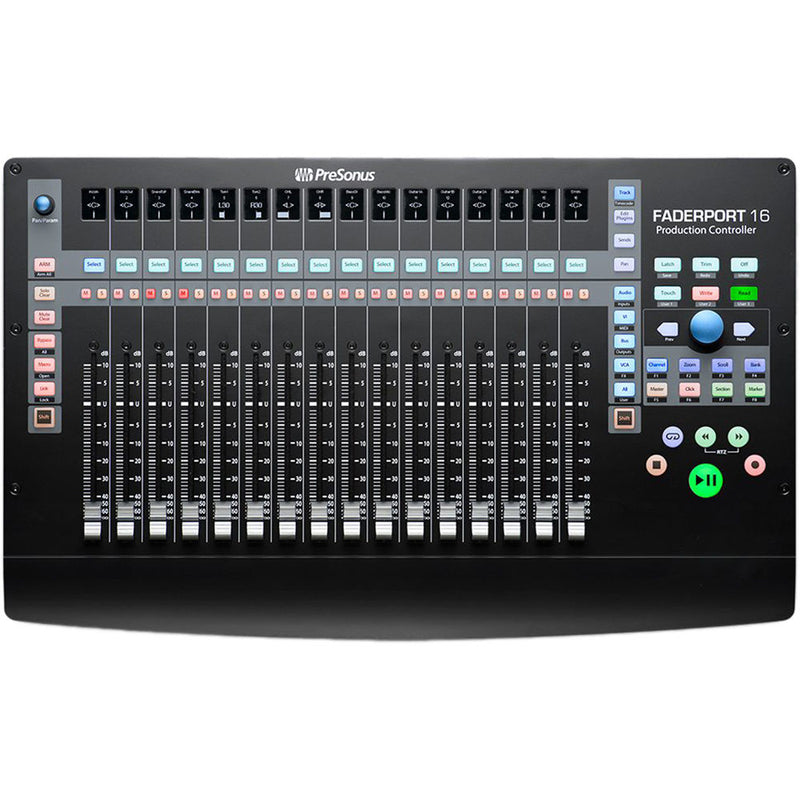
PreSonus FaderPort 16 – 16-Channel Motorized DAW Controller
- 16 Motorised Faders
- DAW Control Surface
- MCU/HUI Protocol
- LCD Scribble Strips
Zdjęcia
3Ogłoszenia
Brak jeszcze ogłoszeń tego modelu
Gdy ktoś wystawi PreSonus Faderport 16, ogłoszenia i historia sprzedaży pojawią się tutaj.
Sprzedaj taki samOpis
PreSonus FaderPort 16 – 16-Channel Motorized DAW Controller
The PreSonus FaderPort 16 brings hands-on mixing to your workflow with 16 motorized 100 mm faders, digital scribble strips, and full transport control.
Key Features
- 16 touch-sensitive, motorized faders: Long-throw design with dual-servo motors, ultra-smooth control at 10-bit resolution (1 024 steps).
- Digital scribble strip displays: Each channel features a high-definition label strip for intuitive track identification.
- Session Navigator: Central encoder lets you scroll tracks, zoom timelines, move between events and markers—all without touching your mouse.
- Comprehensive transport and DAW controls: Play, Stop, Record, Loop, Drop Marker, Undo/Redo, Solo/Mute Clear, Track Management, Click Toggle, and more.
- Full automation support: Touch, Latch, Trim, Write, Read, and Off modes give precision control over your automation movements.
- Macro & user button flexibility: Four programmable user buttons, eight function buttons, macro assignments, and more—customise to suit your workflow.
- DAW compatibility: Native Studio One support plus HUI and Mackie Control emulation for Logic, Cubase, Pro Tools, Ableton Live, and others. MIDI mappable for deeper control.
- Footswitch input: Pair with a footswitch for hands-free start/stop control during recording.
Customer Benefits
Stop clicking and adjust your mix with confidence and speed. The motorized faders center your volume control physically, while the Session Navigator and customizable buttons let you stay creative and efficient—without reaching for your mouse.
Quick Specs
- Faders: 16 × 100 mm motorized, touch-sensitive, long-throw; 10-bit, 1 024-step resolution
- Controls: Transport, track and automation, session navigation, macros, undo/redo, markers
- Display: 16 digital scribble-strip label screens, timecode display
- Connectivity: USB-B 2.0; footswitch input; external 12 V DC 2 A power supply included
- Dimensions (W × D × H): Approximately 49.8 cm × 30.2 cm × 5.4 cm
- Weight: Approximately 3.6 kg
What’s in the Box
- FaderPort 16 control surface
- USB-B cable
- 12 V DC power supply
- Download code for Studio One Artist
Use Cases / Ideal For
Ideal for studios tackling multi-track mixing, post-production, and immersive audio work. Perfect for anyone managing large sessions or who prefers tactile workflow control—bringing physical response to digital mixing.
Compatibility
Works seamlessly across macOS and Windows. No drivers required—just plug in and use it with Studio One, or integrate with other DAWs using HUI, MCU, or MIDI mapping.
Pros & Cons
✅ Pros:
- 16 motorized faders offer powerful tactile control
- Session Navigator speeds navigation and editing
- Flexible customization with macros and programmable buttons
- Compact surface with immersive, hands-on workflow
⚠️ Cons:
- Requires external power—cannot be powered via USB alone
- No dedicated pan knobs—panning control must be layered via fader modes
The PreSonus FaderPort 16 elevates mixing with physical precision, deep control access, and intuitive workflow enhancements—built for creators who want to stay in the moment.
Specyfikacja
- Marka
- PreSonus
- Model
- Faderport 16
- Kategoria
- Studio › Inny sprzęt studyjny
- Typ
- Control Surface
- Wejścia
- 1x footswitch
- Połączenie z komputerem
- USB-B
- Funkcje interfejsu
- Motorized faders, Display, Transport controls, Expression pedal input
- Łączność
- USB
- Zasilanie
- USB
- Pady
- 0
- Kompatybilność
- macOS, Windows
- Waga
- 3.6 kg
- Wymiary
- 49.8 × 30.2 × 5.4 cm
Dokumenty
PDF Instrukcja obsługiWersje i kolory
- Presonus Faderport 8 W sprzedaży
- Presonus Faderport V2 W sprzedaży